#linqin tutorial #sell digital products linqin #linqin product shop
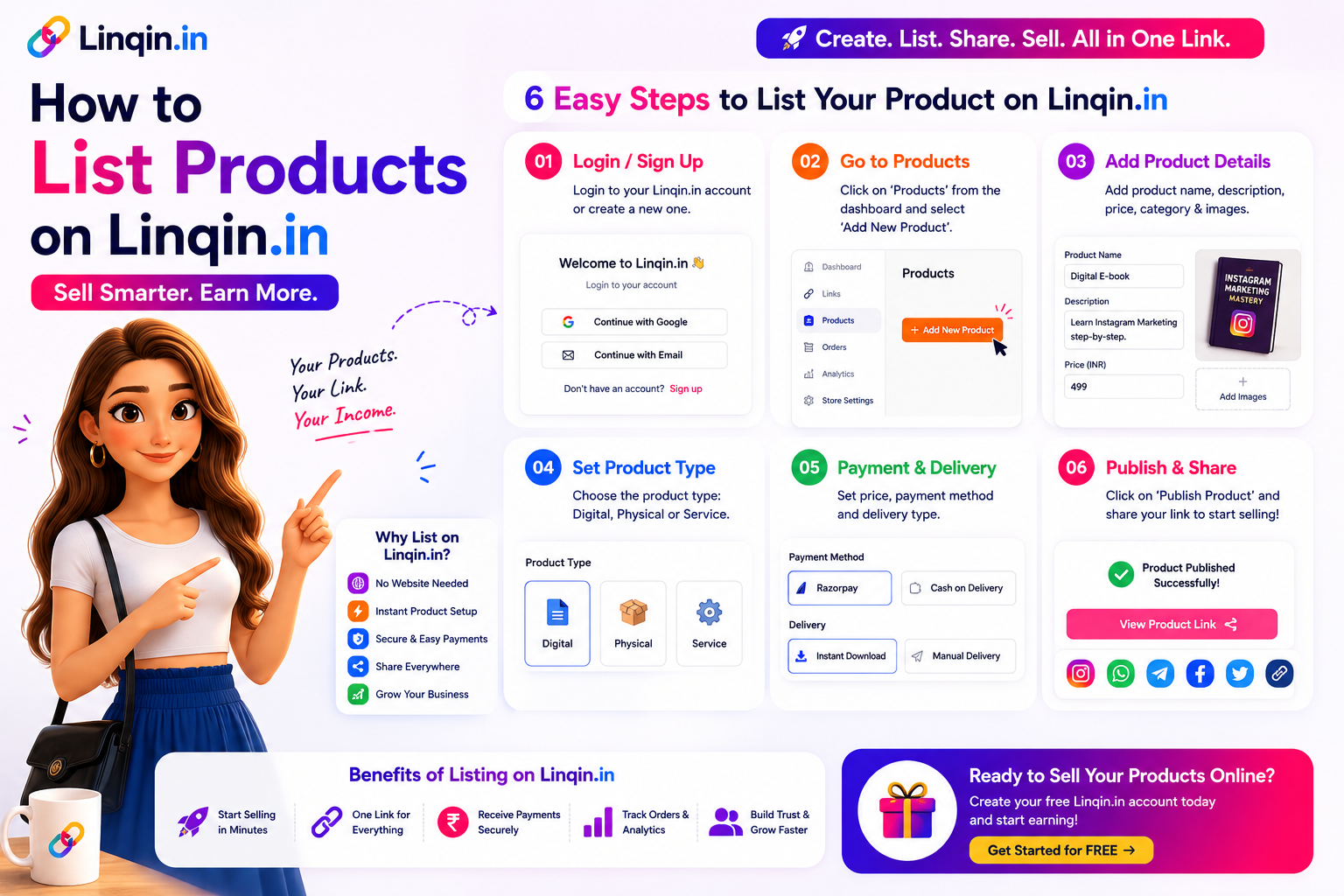
How to List Products on Linqin.in and Start Selling (Step-by-Step Guide)
By Hemant Linqin · 📅 22 May 2026 · ⏱ 20 min read
How to List Products on Linqin.in and Start Selling (Step-by-Step Guide)

Complete step-by-step guide to listing digital products on Linqin.in — set price, connect Razorpay UPI, upload file, publish and promote. Free plan, 0% commission. Setup in 10 minutes.

Linqin Tutorial · Product Shop · Step-by-Step

How to List Your Products
on Linqin.in and Start Selling

Your Linqin.in page can do much more than just show links. In less than 10 minutes, you can add a digital product with UPI checkout and start earning directly from your Instagram bio. Here's exactly how.

H
Hemant Linqin · Linqin.in · May 2026 · 7 min read 📦 Platform Tutorial
🔑 Login
📦 Add Product
💳 Set Price
🚀 Publish
First Sale
From zero to selling in under 10 minutes — complete product setup guide
Razorpay UPI 0% platform fee Digital & physical Free plan Step-by-step

One of the most powerful — and most underused — features of Linqin.in is the built-in product shop. Instead of sending followers to a separate Gumroad page, a Shopify store, or asking them to "DM to pay," you can list your digital products directly on your Linqin bio page and accept payments via UPI, GPay, PhonePe, credit cards, and more.

No separate platform. No developer. No transaction fees from Linqin. This tutorial walks you through every step — from logging into your dashboard to seeing your first sale notification.

10m
To list and publish your first product
0%
Platform fee charged by Linqin
6+
Payment methods accepted
₹0
Cost to set up your product shop
💡
Before You Start

You need a free Linqin.in account and a Razorpay account (free to create at razorpay.com) to accept UPI payments. If you haven't done these yet, create both before following this guide. Razorpay verification takes 24–48 hours.

FirstWhat Can You Sell on Linqin.in?

Linqin's product shop supports both digital and physical products. Here are the most popular product types Indian creators are selling:

📚
eBook / PDF Guide
Downloadable PDF file delivered instantly after payment
₹99 – ₹999
🎨
Canva Templates
Share a Canva link after payment — delivered via email
₹199 – ₹1,499
🎓
Mini Course
Video course hosted on Google Drive or YouTube (unlisted)
₹499 – ₹4,999
📅
Consultation Slot
Pay upfront, then book via Calendly or Google Calendar
₹999 – ₹9,999
🎵
Presets / Templates
Lightroom presets, CapCut templates, spreadsheet files
₹299 – ₹1,999
📦
Physical Product
Collect advance payment before shipping handmade or custom items
Any price

Step 1Go to Your Linqin Dashboard

1
Login and Navigate to Products
Your product shop lives in the Dashboard

Go to linqin.in/login → enter your credentials → you'll land on your Dashboard. From the left sidebar, click Products (or go directly to linqin.in/dashboard/products).

You'll see your existing products here (empty if this is your first time). Click the "+ Add Product" button in the top right corner to begin.

Step 2Fill in Your Product Details

2
Add Product Name, Description & Cover Image
Good product details = more conversions

The product form has several fields. Here's what to enter in each:

Product Name
Write a clear, benefit-focused name. Not "My eBook" — but 30-Day Home Workout Plan for Indian Women. The name appears as the product title on your Linqin page.
Description
2–4 sentences describing exactly what the buyer gets, who it's for, and what problem it solves. This appears below the product name. Good descriptions increase conversions by 30%+.
Cover Image
Upload a 1200×900px image (or square 1:1). Create it free in Canva — use your product title as the main text on a coloured background. Visually appealing cover images increase click-throughs significantly.
Product Type
Choose from: Digital Download (auto-delivers file), External Link (delivers a URL after payment — for Canva links, Google Drive, etc.), or Service/Session (for consultations and physical products).
linqin.in/dashboard/products/new
📦 Add New Product
Free Plan
Product Name
30-Day Home Workout Plan for Indian Women
Price (INR)
₹499
Product Type
Digital Download
Description
A complete 30-day progressive workout program designed specifically for Indian women working from home. Includes daily routines, diet tips, and tracking sheets...
Payment Methods
✓ UPI ✓ GPay ✓ Cards ✓ Net Banking ✓ EMI PayPal
Publish Product →

📸 Linqin Dashboard → Products → Add New Product

Step 3Set Your Price

3
Price in INR — Tips for Maximising Conversions
The right price matters more than most creators think

In the Price field, enter your product price in Indian Rupees (₹). Linqin accepts any amount — ₹0 for free products (great for lead magnets) up to any amount for premium offerings.

Pricing guidelines for Indian market:

  • Lead magnet / freebie: ₹0 — use to capture email and WhatsApp leads
  • Entry product (checklists, short guides): ₹99–₹299
  • Core digital product (eBook, template pack): ₹299–₹999
  • Premium product (full course, coaching pack): ₹999–₹4,999
  • High-ticket (1:1 consultation, mastermind): ₹2,999–₹9,999
💡
Pricing Tip

Use psychological pricing — ₹499 converts better than ₹500. ₹999 converts better than ₹1,000. The difference is in buyer psychology — round numbers feel more expensive. Always end prices in 9 or 99 for digital products.

Step 4Upload Your File or Add Delivery Link

4
How Linqin Delivers Your Product After Payment
Automatic delivery — no manual sending required

This is the step that makes Linqin so powerful — product delivery is completely automatic. When someone pays for your product, Linqin instantly delivers it without any action needed from you.

Digital Download
Click Upload File → select your PDF, ZIP, or any file from your device. Max file size: 100MB. After payment, buyer gets an automatic download link. Supported: PDF, ZIP, MP4, MP3, DOCX, XLSX, PNG, JPG.
External Link
Paste the URL that buyers receive after payment — your Canva template link, Google Drive folder, Notion page, YouTube unlisted video, or any URL. The link is revealed only after successful payment.
Service / Session
Add a thank-you message and your Calendly or Google Forms booking link. After payment, buyers are directed to book their slot. Good for consultations, workshops, and custom orders.
Thank-You Message
Write a custom message shown to buyers after successful payment. E.g. "Thank you! Your workout plan is downloading now. Reply to this email if you have any questions 🙏"
🔒
Security Note

For External Link products — use Canva's "Anyone with the link can view" setting, not edit. For Google Drive — set to "Anyone with the link can view." This ensures buyers can access the file but cannot edit or delete it.

Step 5Connect Razorpay for UPI Payments

5
Link Your Razorpay Account — One-Time Setup
Takes 5 minutes — then all future products are automatically connected

If you haven't already connected Razorpay, go to Dashboard → Settings → Payments → Connect Razorpay. Enter your Razorpay API Key ID and Secret Key (found in your Razorpay Dashboard → Settings → API Keys).

Once connected, every product you list will automatically accept: UPI (GPay, PhonePe, Paytm, BHIM), Debit cards (all Indian banks), Credit cards (Visa, Mastercard, RuPay), Net banking (100+ banks), and EMI (no-cost EMI on eligible cards).

🌍
International Payments

To accept payments from overseas buyers in USD, EUR, or GBP — also connect your PayPal account in the same settings page. Indian buyers will see Razorpay, international buyers will see PayPal — automatically.

Step 6Publish and Preview Your Product

6
Go Live and Test the Full Purchase Flow
Always test before promoting — ensure the full buyer experience is smooth

Click "Publish Product" at the bottom of the form. Your product is now live on your Linqin page. Open your page at linqin.in/yourname in a new tab to see exactly how it appears to visitors.

Always test the full purchase flow before promoting. Use Razorpay's test mode to make a ₹1 test purchase — verify the payment goes through, the product delivers automatically, and you receive the order notification.

linqin.in/yourname — product visible to visitors
📚
30-Day Home Workout Plan for Indian Women
₹499
✓ UPI · GPay · Cards 🚀 Live

📸 How your product appears on your Linqin bio page to visitors

Step 7Promote Your Product from Instagram

7
Drive Instagram Traffic to Your New Product Listing
Your product is live — now send your followers to it

With your product live on your Linqin page, the next step is driving your Instagram audience to it. Here are the most effective promotion tactics:

  • Update your Instagram bio text: Add a mention of your product. E.g. "🏋️ 30-Day Workout Plan — ₹499 — link in bio 👆"
  • Post a Reel about the problem your product solves: End with "Full plan is in my bio link — ₹499 with instant UPI payment"
  • Use comment automation: Set up Linqin's Instagram automation — when someone comments PLAN, they automatically receive a DM with your product link
  • Add to your Instagram Stories weekly: Show the product, its benefits, and add the link sticker pointing to your Linqin page
  • Share buyer results: When someone buys and gets results, share their feedback as a story or post — social proof drives more sales

Pro TipsMake Your Product Listing Convert Better

✅ Product Listing Optimisation Checklist
Product name includes a clear benefit — not just a title
Must Do
Cover image is 1200×900px, visually appealing, created in Canva
Must Do
Price ends in 9 or 99 (₹499 not ₹500, ₹999 not ₹1,000)
Must Do
Full purchase tested end-to-end before promoting
Important
Razorpay connected — UPI, cards, and EMI all active
Must Do
Instagram bio text mentions the product and price
Boosts Sales
Comment automation set up — triggers DM with product link
Boosts Sales
Thank-you message personalised and includes next steps
Good UX
"The best time to list your first product was last month. The second best time is right now. Your audience is waiting — they just need a link to click and a UPI button to tap."
Linqin Creator Tips · 2026

FAQFrequently Asked Questions

Is it free to list products on Linqin.in? +
Yes — listing products on Linqin.in is completely free. The free plan allows up to 20 products. Linqin charges 0% commission on any sale. You only pay the standard Razorpay gateway fee (~2%) which is charged by Razorpay, not Linqin. The Pro plan (₹499/month) removes the 20-product limit for unlimited products.
What types of files can I upload as a digital product? +
Linqin supports PDF, ZIP, MP4, MP3, DOCX, XLSX, PNG, JPG, and most common file formats up to 100MB. For larger files (like full video courses), use the External Link option — upload your file to Google Drive and paste the shareable link. Buyers receive the link automatically after payment.
How does Linqin deliver the product to the buyer after payment? +
Automatically. When a buyer completes payment via Razorpay, Linqin immediately sends them an email with the download link (for Digital Download products) or the external URL (for External Link products). The buyer also sees the delivery on the post-payment screen. You receive an order notification at the same time. No manual work needed from you.
Can I sell physical products on Linqin.in? +
Yes — use the Service/Session product type for physical products. Set your price, collect payment upfront via Razorpay UPI, and add a thank-you message with your WhatsApp number or a Google Form for shipping details. This works well for handmade items, custom products, prints, and advance bookings.
Can I offer a free product to capture leads? +
Yes — set the price to ₹0 for a free product. When combined with Linqin's lead capture funnel, visitors fill in their name and email to access the free product. This is the most effective way to build your email list — offer a valuable free checklist or guide, capture their details, then follow up with paid product promotions via email.

List your first product
in the next 10 minutes — free.

Free plan · 20 products · Razorpay UPI · 0% commission · Instant delivery

Free to start 0% platform fee Razorpay UPI built-in Made in India 🇮🇳
🚀 Create Free Linqin Page →
linqin.in/yourname · No credit card · 10 min setup

Key Takeaways

  • Linqin helps creators, influencers and entrepreneurs build their online presence and monetize their audience.
  • Creators can use Linqin to sell digital products, create smart bio pages and grow their online business.
  • Linqin provides tools for creator monetization, referral income systems and audience growth.

About Linqin

Linqin is an all-in-one creator platform that helps creators create bio link pages, sell digital products, collect leads and build online income systems.

Learn more at About Linqin

Tags: #linqin tutorial #sell digital products linqin #linqin product shop #razorpay upi linqin #how to sell on linqin #linqin guide #digital products india
💬 Share this article
Hemant Linqin
Hemant Linqin
Linqin Team creates expert resources about creator economy, digital products, online business growth and creator monetization.
Visit @hemantlinqin's Profile →
📚 Related Articles
🚀

Ready to Start Your Creator Journey?

Create your free Linqin page in 2 minutes. Share links, sell products, capture leads.

Create Free Page →